

Appearance
Autodelist
Crosslist helps you keep your inventory accurate across all connected marketplaces.
Autodelist automatically removes or updates the quantity of your other active listings when an item sells on one marketplace. This helps prevent double sales, reduces manual work, and keeps your multichannel inventory in sync.
Autodelist works together with sales tracking. When Crosslist detects a sale, it records the sale in your account and then updates the remaining listings based on your item quantity and the marketplace’s capabilities.
INFO
To use this feature you need the Gold or Diamond subscription.
How autodelist works
When Crosslist detects that an item has sold, it checks:
- Which marketplace the item sold on
- How many units were sold
- How many units are still available in Crosslist
- Which other marketplaces the item is listed on
Based on this information, Crosslist will either:
- Delist the item from other marketplaces
- Reduce the available quantity where supported
- Relist the listing where needed
Enable autodelist
To enable autodelist:
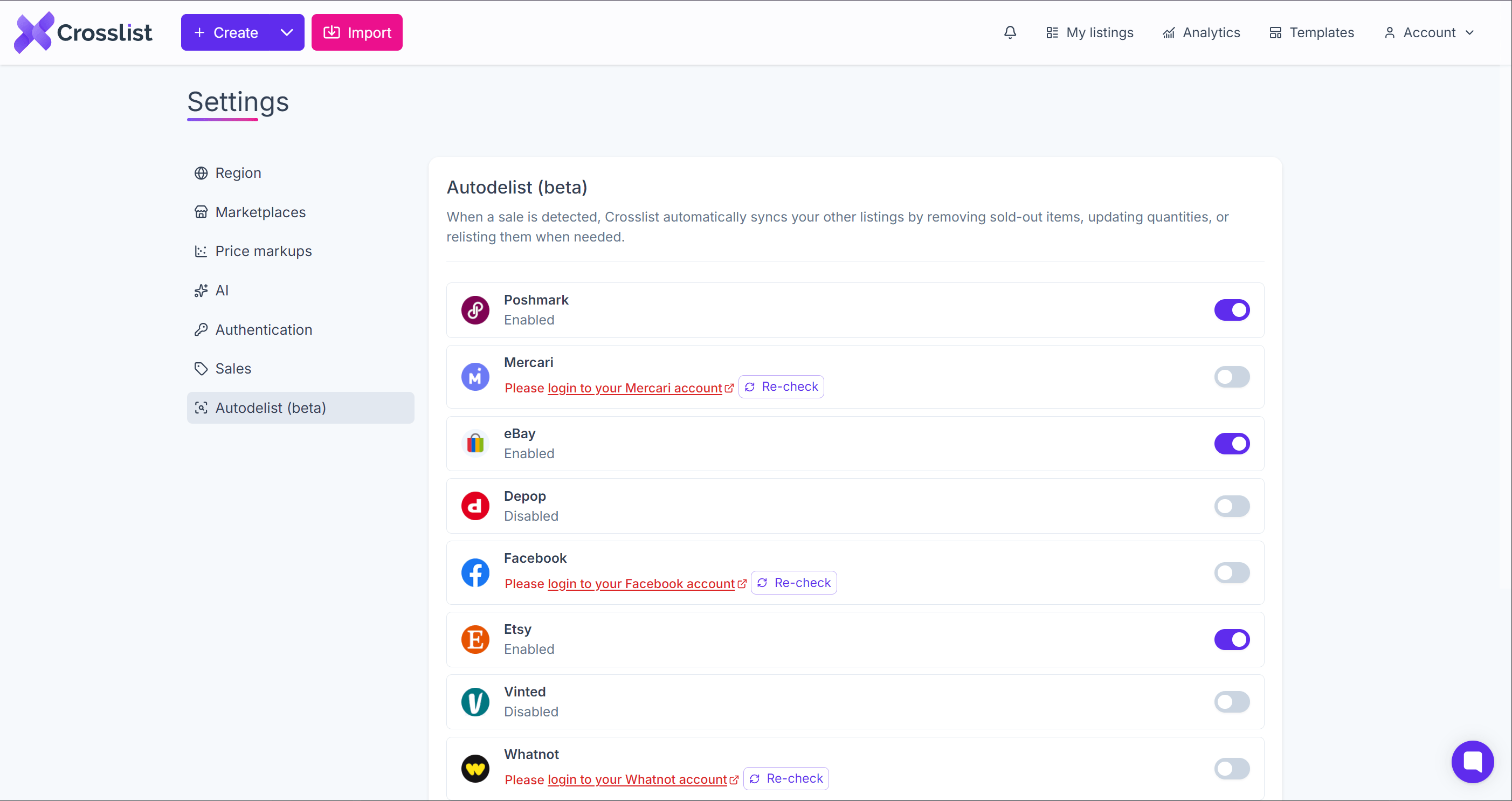
- In Crosslist, go to Account, then Settings, then the Autodelist page
- Toggle on autodelist for each marketplace you want to enable
- Make sure you are signed in or connected to each selected marketplace
- Keep the Crosslist Chrome extension active for extension-based marketplaces
Once enabled, Crosslist will start checking for sales and applying autodelist actions where supported.
Sales detection & delist
How autodelist behaves for a given marketplace depends on two things:
- How Crosslist detects sales there (cloud-based or Chrome extension-based).
- Whether the marketplace supports listing more than one unit at a time.
This table is the key reference for understanding the behavior sections below. It decides whether Crosslist delists, reduces quantity, or relists an item after a sale.
| Marketplace | Sales detection | Quantity type | Action when stock remains |
|---|---|---|---|
| eBay | Cloud-based | Multi-quantity | Reduces quantity |
| Etsy | Cloud-based | Multi-quantity | Reduces quantity |
| Shopify | Cloud-based | Multi-quantity | Reduces quantity |
| WooCommerce | Cloud-based | Multi-quantity | Reduces quantity |
| Depop | Cloud-based | Multi-quantity | Reduces quantity |
| Whatnot | Chrome extension | Multi-quantity | Reduces quantity |
| Poshmark | Chrome extension | Multi-quantity | Reduces quantity |
| Mercari | Chrome extension | Single-quantity | Relists |
| Grailed | Chrome extension | Single-quantity | Relists |
| Facebook Marketplace | Chrome extension | Single-quantity | No action |
| Vinted | Chrome extension | Single-quantity | No action |
WARNING
Vinted is not available for new users. Since Sep 23, 2026, new Crosslist accounts can no longer connect Vinted. Existing Vinted users are not affected. More info
How Crosslist detects sales
Crosslist detects sales in one of two ways. The table above shows which method each marketplace uses.
Sales are usually detected within 15 minutes. On Vinted, this can take up to 30 minutes.
WARNING
Crosslist only detects sales for linked listings, meaning Crosslist has the marketplace URL for that listing. Sales of unlinked listings are not detected. See Linking existing listings.
Cloud-based detection
Crosslist checks for sales on its own servers. You don't need to keep your computer or browser open.
Chrome extension-based detection
Crosslist checks for sales through the Crosslist Chrome extension. For this to work, you need:
- The Crosslist Chrome extension installed on a desktop browser
- Your computer and browser to be active from time to time
WARNING
If your computer is off or asleep, or your browser stays closed for a long time, Crosslist may not detect sales on these marketplaces right away. Keep your computer awake and your browser open to keep autodelist working.
Limitations
- Vinted only supports listings with a quantity of 1 and does not allow the same listing to be relisted. If an item sells on Vinted while you still have remaining quantity in Crosslist, the Vinted listing won't be relisted.
- Autodelist is not supported for multi-variant listings.
- Extension-based sales detection runs every 15 minutes.
- Autodelist only applies to new sales detected after it has been enabled. Historical sales can be imported, but they will not trigger autodelist actions.
- Manually adding a sale (through manage sales) will not trigger a delist, quantity reduction or relist. Only automatically detected sales do.
- Crosslist cannot detect canceled sales. If a sale is canceled after the item has already been delisted, you will need to relist the listing manually.